What goes wrong when pay is worked out by hand
If a center pays teachers a percentage, their salary depends every month on student payments: some paid in full, some in part, some got a discount, some were refunded. When all of that is pulled together by hand, this is what usually happens:
- an advance paid mid-month is forgotten and paid twice;
- the teacher's share is not clawed back for a student who was refunded;
- the teacher cannot see the calculation and does not trust it;
- the director does not know how much the center owes teachers in total;
- salaries and advances paid from the till never reach the report.
Three schemes: fixed, percentage or mixed
Each teacher gets their own scheme: a fixed monthly salary, a percentage of group revenue, or both together. For example, an experienced teacher can be on fixed plus percentage and a new one on percentage only. The percentage is calculated from net revenue after refunds, so money returned to a student never counts towards pay.
Revenue comes from payments, and payments come from each student's debt ledger: debt opens itself every month, goes down when a payment is made, and discounts are taken off the debt. That means the salary calculation rests on the real money in the till. More: student payment and debt tracking.
Advances and automatic deduction
In the middle of the month you pay a teacher an advance with an amount, month, payment method and comment. The list of advances and their statistics are kept separately, and an advance paid by mistake can be cancelled. When the salary is calculated, the advance is subtracted automatically and the result is shown as "salary minus advance" — nobody has to hunt for a scrap of paper.
An advance paid from the till shows up straight away in the daily cash report and the center's balance, and appears as its own line among expenses in the monthly report.
The teacher's share when a student is refunded
If a student quits, the system works out the refund for the lessons not taken. If the teacher has already received their share of that student's payment, it can be deducted from the teacher's account at the time of the refund. That way the center never pays the same money twice — once to the student and once to the teacher.
How a month's pay comes together
Say a teacher is paid a percentage of group revenue. At the start of the month a debt entry opens for every student. During the month students pay in full or in part, and each payment goes into the till and is added to that group's revenue. Mid-month the teacher takes an advance, which is recorded as money out of the till.
That same month one student quits and is refunded for the lessons not taken, and that amount comes off the revenue. At month end the system calculates the percentage of net revenue and subtracts the advance. When the salary is paid, it appears in the daily cash report and in the monthly report's expenses. Every step stays in the history, so any figure can be checked after the fact.
Teachers see their own figures
In their panel and in the mobile app, teachers see the payments from their own groups, their salary, advances and balance history. They can check where a figure comes from themselves, which means fewer arguments at month end. Other teachers' pay and the center's overall finances stay hidden — every role has a limited view.
What the director sees
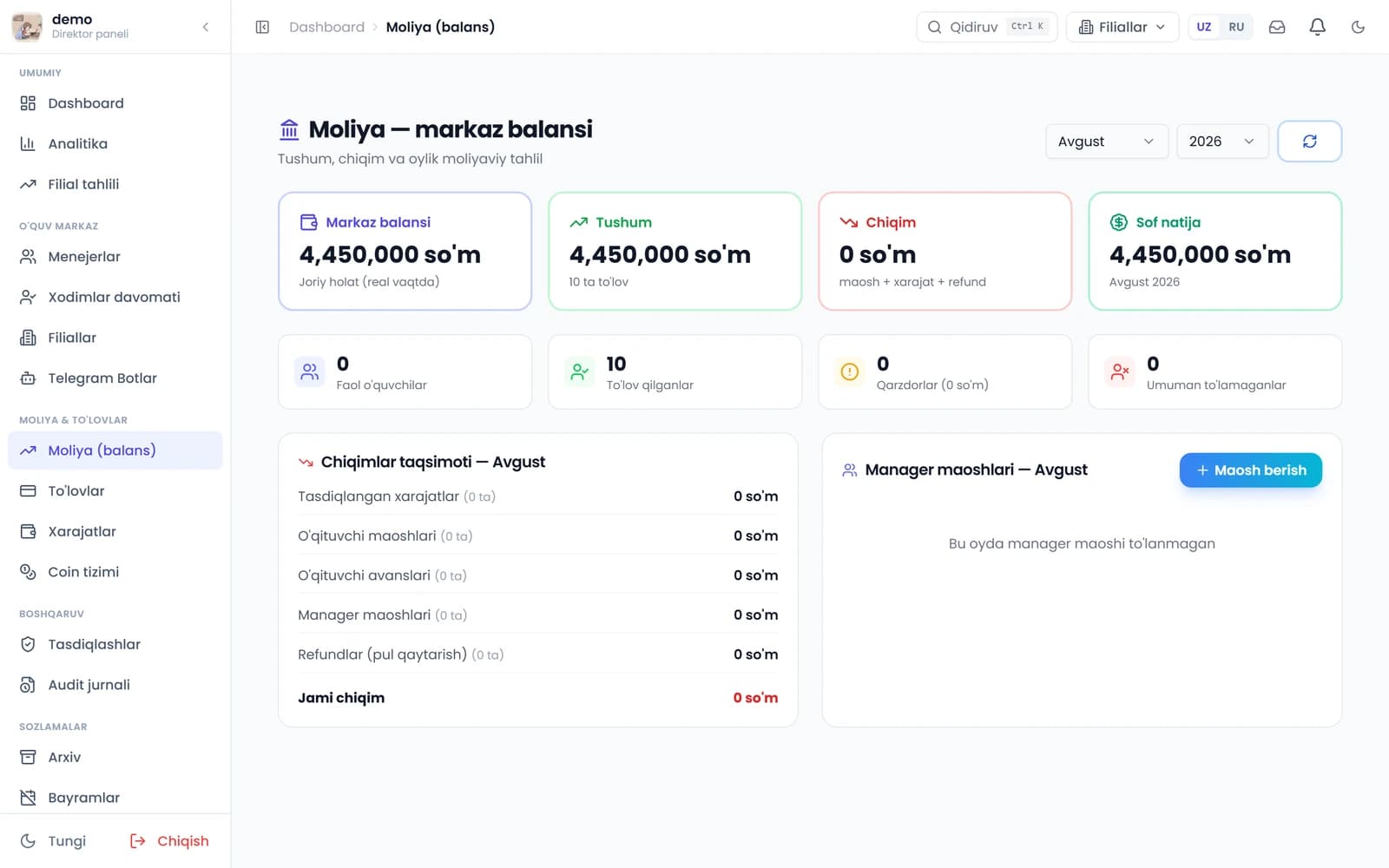
On the Finance page, next to the center's balance, the director sees the teachers' share that has been earned but not yet paid, the net remainder after it, and the 10 teachers owed the most. The monthly report splits expenses into five types: approved expenses, teacher salaries, teacher advances, manager salaries and refunds.
Manager pay is handled here too: on the Finance page the director selects a manager and pays a salary with a month and amount, and it is added to the expenses in the monthly report. More: teacher pay and payroll.
Comparing teachers' work
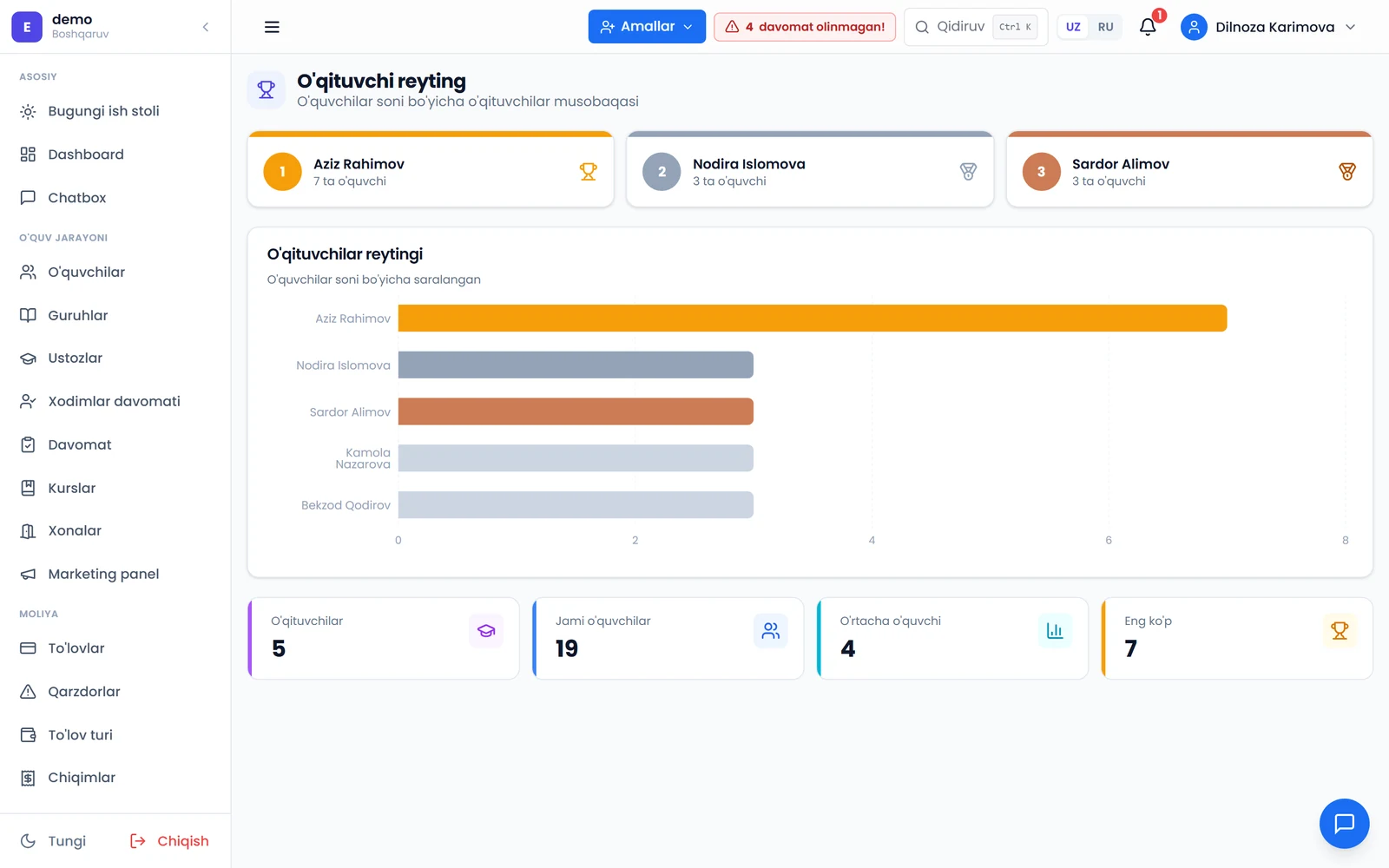
The manager panel has a teacher leaderboard that ranks teachers by number of students, with the teacher who has the most in first place. In the progress analytics in the teacher panel, groups are compared by average score and a six-month trend is shown.
Attendance discipline is on the record too: attendance must be taken within 48 hours of the lesson starting, how many minutes late it was taken is saved, and an alert goes out if there are no marks after 20 minutes. More: attendance tracking software.
How to get started
The trial lasts 30 days with every feature open, and your data stays afterwards. Plans start at 200 000 UZS a month and differ only in size, including the number of teachers: pricing. How to test payroll when choosing a CRM: 7 practical criteria.
- Sign up at director.educrm.pro/register — no card required.
- Add your teachers and set a scheme for each: fixed, percentage or mixed.
- Assign groups to teachers and upload students with the Excel template.
- Enter students' current debts so revenue is counted from that point on.
- At the end of the first month, compare the system's figures with your old calculation.
Frequently asked questions
What amount is the percentage taken from?
From payments received for the teacher's groups — net revenue after refunds. Discounts are taken off the debt at the time of payment, so the calculation is based on money actually received.
How is an advance deducted from the salary?
When the salary is calculated, the advance paid for that month is subtracted automatically, giving salary minus advance. Teachers can see the advances they have received in their own panel.
What happens to a teacher's pay if a student is refunded?
Because the percentage comes from net revenue, the refunded amount does not count towards pay. If the teacher has already received their share, it can be deducted from their account at the time of the refund.
Can teachers see each other's pay?
No. Teachers only see payments from their own groups and their own salary, advances and balance. Colleagues' pay and the center's finances are closed to them.
Is manager pay recorded as well?
Yes. On the Finance page the director selects a manager and pays a salary with a month and amount, and it is added to the expenses in the monthly report.